CI checks#
Autoware has several checks for a pull request. The results are shown at the bottom of the pull request page as below.
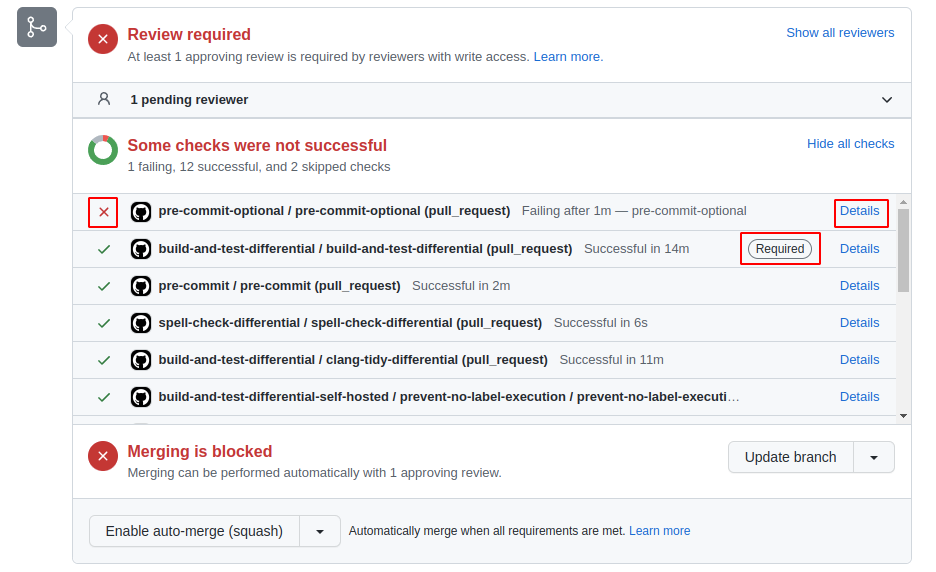
If the ❌ mark is shown, click the Details button and investigate the failure reason.
If the Required mark is shown, you cannot merge the pull request unless you resolve the error. If not, it is optional, but preferably it should be fixed.
The following sections explain about common CI checks in Autoware.
Note that some repositories may have different settings.
DCO#
The Developer Certificate of Origin (DCO) is a lightweight way for contributors to certify that they wrote or otherwise have the right to submit the code they are contributing to the project.
This workflow checks whether the pull request fulfills DCO.
You need to confirm the required items and commit with git commit -s.
For more information, refer to the GitHub App page.
semantic-pull-request#
This workflow checks whether the pull request follows Conventional Commits.
For the detailed rules, see the pull request rules.
pre-commit#
pre-commit is a tool to run formatters or linters when you commit.
This check makes sure that pre-commit finds no errors in the pull request. Most public repositories run it with pre-commit.ci, which shows the pre-commit.ci - pr check. autoware_universe runs it with the pre-commit-lite workflow instead. Private repositories run it with the pre-commit workflow.
pre-commit.ci and pre-commit-lite fix as many errors as they can and push the fixes to your branch as a style(pre-commit): autofix commit. If some errors remain, fix them manually.
You can run pre-commit in your local environment by the following command:
pre-commit run -a
Or you can install pre-commit to the repository and automatically run it before committing:
pre-commit install
Since it is difficult to detect errors with no false positives, some jobs are split into another config file and marked as optional.
To check them, use the --config option:
pre-commit run -a --config .pre-commit-config-optional.yaml
Matching your local clang-format to pre-commit#
pre-commit uses the clang-format version pinned in .pre-commit-config.yaml, so pre-commit run -a always matches CI. Your editor and manual runs use the clang-format on your PATH, which may be another version and format code differently.
To install the pinned version, take the rev of mirrors-clang-format in .pre-commit-config.yaml, for example v23.1.1, and run:
sudo apt install pipx
pipx ensurepath
pipx install --force clang-format==23.1.1
Then open a new terminal and check the version:
clang-format --version
If it still shows another version, log out and log in again.
spell-check-differential#
This workflow detects spelling mistakes using CSpell with our dictionary file. Since it is difficult to detect errors with no false positives, it is an optional workflow in many repositories, but it is preferable to remove spelling mistakes as many as possible. Some repositories, such as autoware_universe, autoware_core, and autoware_tools, make it a required check.
You have the following options if you need to use a word that is not registered in the dictionary.
- If the word is only used in a few files, you can use inline document settings "cspell:ignore" to suppress the check.
- If the word is widely used in the repository, you can add it to a local
.cspell.jsonfile and pass the file to the spell-check action with thelocal-cspell-jsoninput. - If the word is common and can be used in many repositories, you can submit pull requests to autowarefoundation/autoware-spell-check-dict or tier4/cspell-dicts to update the dictionary.
build-and-test-differential#
This workflow checks colcon build and colcon test for the pull request.
To make the CI faster, it doesn't check all packages but only modified packages and the dependencies. It builds and tests the packages for both ROS 2 Humble and ROS 2 Jazzy.
In most repositories (for example autoware_universe, autoware_core, and autoware_launch), the workflow runs only when the pull request has the run:build-and-test-differential label. Without the label, the require-label check fails. autoware_tools uses the tag:run-build-and-test-differential label instead. Without this label, the workflow skips the build and the check does not fail. Add the label when the pull request is ready for CI. If you cannot add labels, ask a reviewer or a maintainer.
In autoware_universe, the build-test-tidy-pr workflow runs this check together with related checks:
build-and-test-differential-cudabuilds and tests the modified packages with CUDA when the pull request changes theperception,sensing, orplanning/autoware_diffusion_plannerdirectories.build-and-test-packages-above-differentialbuilds the packages in other repositories that depend on the modified packages, for exampleautoware_launchandautoware_tools. Thepackages_above.reposfile lists these repositories.clang-tidy-differentialrunsclang-tidyon the changed files of the modified packages after the build succeeds. If the CUDA job runs,clang-tidy-differential-cudadoes this check instead, in the CUDA environment.
The CUDA and packages-above jobs run on self-hosted runners that the Autoware Foundation provides. For details about self-hosted runners, refer to GitHub Docs.
cppcheck-differential#
This workflow runs Cppcheck on the modified packages that contain C++ files. autoware_universe and autoware_core use it.
deploy-docs#
This workflow builds the documentation site for every commit of the pull request.
If the branch of the pull request is in the repository itself, the workflow also publishes a preview and adds a comment with its URL.
If the branch is in a fork, the workflow uploads the built site as an artifact, because a pull request from a fork gets a read-only token. The summary of the run explains how to download and view the site.
Some repositories still use an older version of this workflow. In these repositories, the preview is built only after a maintainer adds the run:deploy-docs label to the pull request.
comment-docs-artifact#
This workflow runs after deploy-docs for a pull request from a fork, and adds a comment with the download link of the built site.
It runs from the default branch and does not run the code of the pull request.