Creating Autoware repositories#
What is a meta-repository?#
A meta-repository is a repository that manages multiple repositories, and Autoware is one of them. It serves as a centralized control point for referencing, configuring, and versioning other repositories. To accomplish this, the Autoware meta-repository includes the repositories/autoware.repos file for managing multiple repositories. We will use the VCS tool (Version Control System) to handle the .repos file. VCS provides us with the capability to import, export, and pull from multiple repositories. VCS will be used to import all the necessary repositories to build Autoware into our workspace. Please refer to the documentation for VCS and .repos file usage.
How to create and customize your Autoware meta-repository#
1. Create Autoware meta-repository#
If you want to integrate Autoware into your vehicle, the first step is to create an Autoware meta-repository.
One easy way is to fork the Autoware repository and clone it. (For instructions on how to fork a repository, refer to GitHub Docs)
- In this guide, Autoware will be integrated into a
tutorial_vehicle(Note: when setting up multiple types of vehicles, adding a suffix likeautoware.vehicle_Aorautoware.vehicle_Bis recommended). For the first step, please visit the autoware repository and click the fork button. The fork process should look like this:
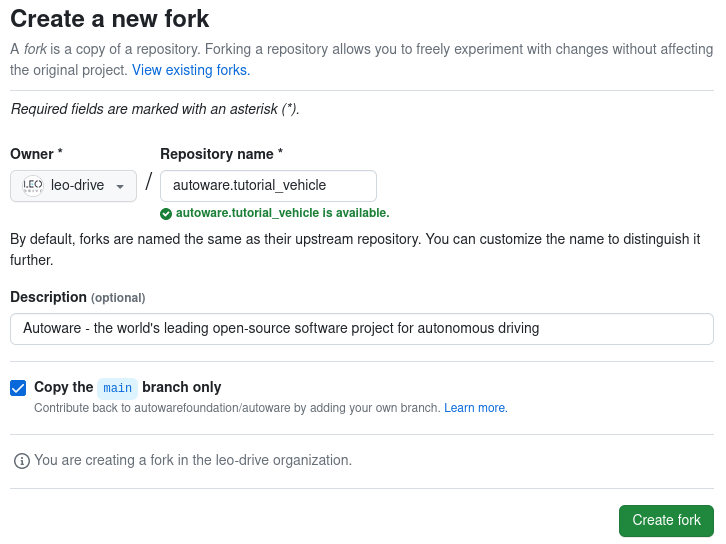
Then click "Create fork" button to continue. After that, we can clone our fork repository on our local system.
git clone https://github.com/YOUR_NAME/autoware.<YOUR-VEHICLE>.git
For example, it should be for our documentation:
git clone https://github.com/leo-drive/autoware.tutorial_vehicle.git
1.1 Create vehicle individual repositories#
In Autoware 2.0.0, the sensor kit packages and the vehicle packages are in the autoware_launch repository. The separate sample_sensor_kit_launch, sample_vehicle_launch, and autoware_individual_params repositories are archived. To integrate Autoware into your vehicle, fork this repository as well:
autoware_launch: This repository contains the launch files and the parameters of Autoware. It also contains these directories for your vehicle:
sensor_kit/: the sensor kit packages, for examplesample_sensor_kit_launch. A sensor kit package holds the sensing launch files and the sensor description, including the sensor calibration files.vehicle/: the vehicle packages, for examplesample_vehicle_launch. A vehicle package holds the vehicle interface launch file and the vehicle description, including the vehicle model.
Fork and rename it like the Autoware meta-repository. In this tutorial, the name of our fork is
autoware_launch.tutorial_vehicle.
In your fork, add your sensor kit package and your vehicle package. For example, copy sensor_kit/sample_sensor_kit_launch to sensor_kit/tutorial_vehicle_sensor_kit_launch, and vehicle/sample_vehicle_launch to vehicle/tutorial_vehicle_launch. Then rename the packages inside them. You can also keep your sensor kit and vehicle packages in separate repositories.
The parameters that change for each vehicle, for example the sensor calibration, are now in the <sensor_model>_description package of your sensor kit. If a vehicle needs its own controller parameters, put them in config/trajectory_follower/<vehicle_id>/ of autoware_control_config and set use_individual_control_param:=true.
2. Customize autoware.repos for your environment#
You need to customize your repositories/autoware.repos to import your forked repositories. The autoware.repos file usually includes information for all necessary Autoware repositories (except calibration and simulator repositories). Therefore, your forked repositories should also be added to this file.
2.1 Adding individual repos to autoware.repos#
After you fork the repositories, open the repositories/autoware.repos file in a text editor. Replace autoware_launch with your fork. For example, in this tutorial, the change for our forked tutorial_vehicle repository is:
Autoware Launch:
  launcher/autoware_launch:
    type: git
-   url: https://github.com/autowarefoundation/autoware_launch.git
-   version: 0.53.0
+   url: https://github.com/YOUR_NAME/autoware_launch.tutorial_vehicle.git
+   version: main
If you keep your sensor kit and vehicle packages in separate repositories, add them too:
Sensor kit and vehicle:
+ sensor_kit/tutorial_vehicle_sensor_kit_launch:
+   type: git
+   url: https://github.com/YOUR_NAME/tutorial_vehicle_sensor_kit_launch.git
+   version: main
+ vehicle/tutorial_vehicle_launch:
+   type: git
+   url: https://github.com/YOUR_NAME/tutorial_vehicle_launch.git
+   version: main
Make similar changes to your own repositories/autoware.repos file. After these changes, you are ready to use VCS to import all the necessary repositories into your Autoware workspace.
First, create a src directory under your own Autoware meta-repository directory:
cd <YOUR-AUTOWARE-DIR>
mkdir -p src
Then, import all necessary repositories with vcs:
cd <YOUR-AUTOWARE-DIR>
vcs import src < repositories/autoware.repos
After the running vcs import command, all autoware repositories will be cloned in the src folder under the Autoware directory.
Now, you can build your own repository with colcon build command:
cd <YOUR-AUTOWARE-DIR>
colcon build --symlink-install --cmake-args -DCMAKE_BUILD_TYPE=Release
Please refer to the following documentation links for instructions on how to create and customize each of your vehicle's packages:
- Creating vehicle and sensor models
- creating-vehicle-interface-package
- customizing-for-differential-drive-model
Please remember to add all your custom packages, such as interfaces and descriptions, to your repositories/autoware.repos to ensure that your packages are properly included and managed within the Autoware repository.